What Is Accounting Software?
Accounting software is a digital tool that helps businesses record, organise, and manage their financial transactions. Instead of manually updating spreadsheets or paper records, businesses can automate everyday accounting tasks such as:
- Recording income and expenses
- Creating professional invoices
- Tracking customer payments
- Managing supplier bills
- Reconciling bank transactions
- Preparing VAT returns
- Running payroll
- Producing financial reports
- Monitoring cash flow
- Keeping digital records for HMRC
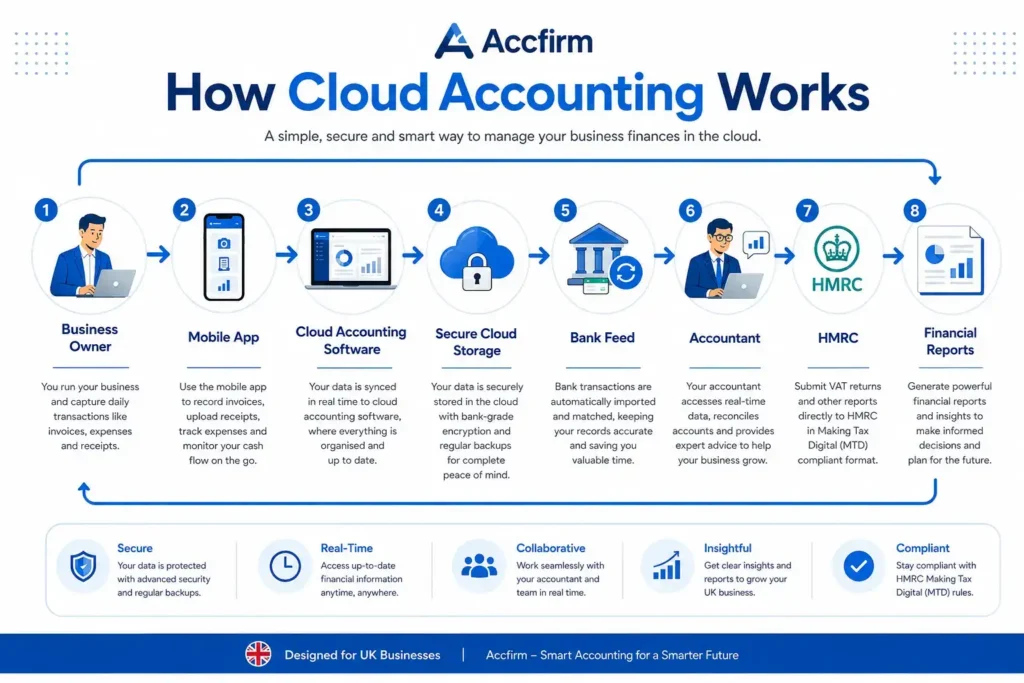
Modern accounting software is usually cloud-based, meaning you can securely access your financial information from anywhere using a computer, tablet, or smartphone.
For many UK businesses, cloud accounting has become an essential part of day-to-day financial management, especially since HMRC introduced Making Tax Digital (MTD) requirements for eligible VAT-registered businesses.
Why Does Accounting Software Matter?
Running a business involves much more than selling products or providing services. Every financial transaction must be accurately recorded to ensure:
- Correct tax calculations
- Timely VAT submissions
- Accurate profit reporting
- Better business decisions
- Compliance with HMRC regulations
Without proper accounting software, business owners often spend unnecessary hours managing paperwork, correcting bookkeeping errors, or searching for missing invoices.
Good software automates much of this work, allowing you to focus on growing your business instead.
Why Small Businesses Need Accounting Software
Many new business owners begin with spreadsheets. While spreadsheets may work during the early stages, they become increasingly difficult to manage as your business grows.
Accounting software provides a more efficient and accurate way to manage finances.
Saves Valuable Time
Manual bookkeeping can consume several hours every week.
Accounting software automates repetitive tasks, including:
- Bank transaction imports
- Invoice creation
- Expense categorisation
- Payment reminders
- VAT calculations
- Financial reporting
Automation reduces administration and gives business owners more time to focus on customers and business growth.
Reduces Human Errors
Typing figures manually increases the risk of mistakes.
Even small bookkeeping errors can lead to:
- Incorrect VAT returns
- Overpaid tax
- Underpaid tax
- Duplicate invoices
- Missing expenses
- Cash flow problems
Most accounting software automatically performs calculations, reducing the likelihood of errors.
Helps Maintain HMRC Compliance
HMRC expects businesses to maintain accurate financial records.
Many accounting platforms support:
- Digital bookkeeping
- VAT submissions
- Making Tax Digital compliance
- Tax calculations
- Record retention
Using compatible software can make tax reporting significantly easier throughout the year.
Improves Cash Flow Management
Cash flow is one of the biggest challenges facing small businesses.
Accounting software helps you monitor:
- Outstanding invoices
- Upcoming bills
- Available bank balances
- Monthly income
- Monthly expenses
- Profit trends
Real-time financial information allows business owners to make informed decisions before cash flow becomes a problem.
Provides Better Financial Insights
Good accounting software includes dashboards and reports that show:
- Monthly revenue
- Profit margins
- Sales performance
- Customer balances
- Expense categories
- Tax liabilities
Instead of waiting until year-end, you can understand your business performance throughout the year.
Benefits of Using Cloud Accounting Software
Cloud accounting software has become the preferred choice for most UK businesses because it offers flexibility, security, and automation.
Access Your Accounts Anywhere
Whether you’re working from your office, home, or travelling, cloud accounting software lets you access your financial records using an internet connection.
This flexibility is particularly useful for:
- Freelancers
- Contractors
- Business owners
- Remote teams
- Accountants
Automatic Software Updates
Unlike traditional desktop software, cloud platforms update automatically.
This means you always have access to:
- Latest features
- Security improvements
- HMRC updates
- Bug fixes
- Compliance changes
There’s no need to install manual updates.
Secure Data Storage
Leading accounting providers invest heavily in data security.
Most platforms include:
- Data encryption
- Automatic backups
- Two-factor authentication
- Secure cloud servers
- User permission controls
Although no online service is completely risk-free, reputable providers generally offer security measures that exceed what many small businesses can implement themselves.
Easier Collaboration
Business owners can securely share access with:
- Chartered accountants
- Bookkeepers
- Payroll specialists
- Business partners
Instead of emailing spreadsheets back and forth, everyone can work from the same set of live financial records.
This reduces duplication and improves accuracy.
Integration With Business Apps
Many cloud accounting platforms connect with other software, including:
- Payment gateways
- Inventory systems
- CRM software
- E-commerce platforms
- Payroll solutions
- Expense management tools
These integrations can streamline your business processes and reduce manual data entry.
How to Choose the Best Accounting Software for Small Business
Choosing accounting software isn’t about selecting the platform with the most features it’s about finding the one that best matches your business needs.
Before making a decision, consider the following factors.
1. Business Size
Different businesses have different accounting requirements.
For example:
- Sole traders may only need invoicing and expense tracking.
- Limited companies often require payroll, corporation tax reporting, and more advanced financial reports.
- Growing businesses may benefit from inventory management and multi-user access.
Choose software that suits your current needs while allowing room for future growth.
2. Budget
Accounting software is available at various price points.
When comparing costs, consider:
- Monthly subscription fees
- Number of users included
- Payroll add-ons
- Extra charges for advanced features
- Customer support options
The cheapest software isn’t always the best value if it lacks essential functionality.
3. HMRC Compatibility
If your business is required to comply with Making Tax Digital, ensure the software supports digital VAT submissions.
Many leading accounting platforms are designed to work with HMRC’s digital services, helping reduce the administrative burden of tax compliance.
4. Ease of Use
Good accounting software should simplify your work—not make it more complicated.
Look for:
- Clear dashboards
- Simple navigation
- Helpful tutorials
- Mobile apps
- Good customer support
A user-friendly interface can significantly reduce the learning curve, especially for business owners without an accounting background.
5. Scalability
As your business grows, your accounting needs will change.
Choose software that can support additional features such as:
- Payroll
- Inventory
- Multi-currency transactions
- Project accounting
- Department reporting
- Multiple users
This helps avoid the disruption of switching platforms later.
6. Customer Support
Reliable customer support can save time when issues arise.
Consider providers that offer:
- Live chat
- Telephone support
- Email assistance
- Knowledge bases
- Video tutorials
- Community forums
Responsive support is particularly valuable during tax deadlines or software updates.
Features Every Best Accounting Software for Small Business Should Include
While every business has unique requirements, there are several core features that most small businesses should look for.
Easy Invoicing
Professional invoices help businesses get paid faster.
Useful invoicing features include:
- Custom branding
- Recurring invoices
- Automatic payment reminders
- Online payment links
- Invoice tracking
Expense Tracking
Recording expenses accurately helps maintain organised accounts and identify allowable business costs.
Good software allows you to:
- Upload receipts
- Categorise expenses
- Track mileage
- Match expenses with bank transactions
Bank Reconciliation
Automatic bank feeds reduce manual work by importing transactions directly from your business bank account.
This makes reconciliation faster and improves bookkeeping accuracy.
Financial Reporting
Reporting tools help you understand how your business is performing.
Look for reports such as:
- Profit and Loss
- Balance Sheet
- Cash Flow Statement
- VAT Reports
- Expense Reports
- Sales Reports
VAT Management
If your business is VAT registered, your software should simplify:
- VAT calculations
- VAT return preparation
- Digital submissions
- VAT reporting
This can save significant time during filing periods.
Payroll Support
Businesses with employees may benefit from integrated payroll functionality.
Payroll features often include:
- Payslips
- PAYE calculations
- National Insurance calculations
- Pension deductions
- Employee records
Mobile App
A mobile app lets you manage finances while on the move.
Common mobile features include:
- Creating invoices
- Photographing receipts
- Viewing reports
- Recording expenses
- Checking customer payments
Automation
Automation reduces repetitive tasks.
Examples include:
- Recurring invoices
- Scheduled reports
- Payment reminders
- Automatic expense categorisation
- Bank transaction matching
These features improve efficiency and reduce manual bookkeeping.
Don’t choose accounting software based solely on popularity. Start by identifying your business requirements, future growth plans, VAT obligations, and reporting needs. The right software is the one that supports your day-to-day operations while making compliance with HMRC as straightforward as possible.
- Accounting software helps UK businesses manage finances more accurately and efficiently.
- Cloud accounting offers flexibility, automation, and secure access to financial records.
- Choosing software depends on your business type, budget, and compliance requirements.
- Essential features include invoicing, expense tracking, bank reconciliation, reporting, VAT management, and payroll.
- Selecting software that can grow with your business can save time and reduce future disruption.
Best Accounting Software Reviews for UK Small Businesses (2026)
In this section, we’ll compare the leading accounting software solutions used by UK small businesses. Each platform has its own strengths, so the right choice depends on your business size, industry, budget, and accounting needs.
Xero Review
Best for Growing Small Businesses
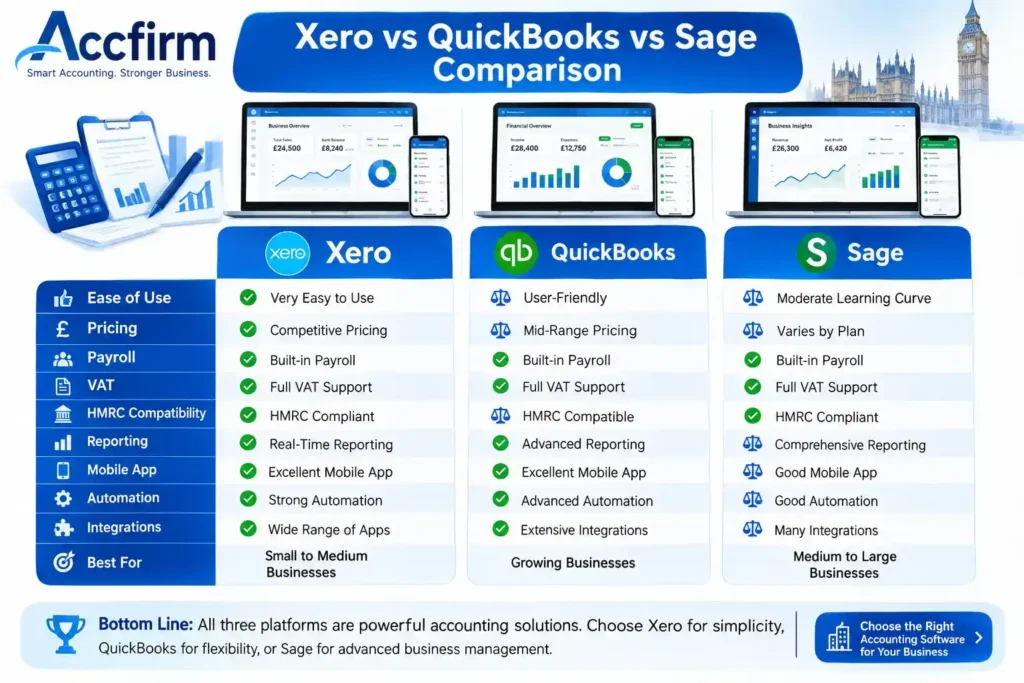
Xero is one of the most popular cloud accounting platforms in the UK. It is designed for sole traders, limited companies, startups, and growing businesses that need an easy-to-use accounting solution with powerful automation.
Key Features
- Unlimited users on most plans
- Online invoicing
- Bank feeds and reconciliation
- VAT returns
- Payroll integration
- Inventory tracking
- Expense management
- Project tracking
- Mobile app
- Multi-currency support (selected plans)
Pros
- Simple and intuitive interface
- Excellent bank reconciliation
- Large marketplace of third-party integrations
- Supports Making Tax Digital (MTD)
- Strong reporting features
- Suitable for growing businesses
Cons
- Lower-priced plans have some feature limitations.
- Payroll may require additional costs depending on your requirements.
- Advanced inventory features may not suit larger retailers.
Best For
- Limited companies
- SMEs
- Startups
- Growing businesses
- Professional service firms
If you expect your business to grow quickly or plan to work closely with an accountant, Xero is one of the strongest long-term choices due to its scalability and integration options.
QuickBooks Review
Best for Automation and Ease of Use
QuickBooks Online is another leading accounting platform trusted by millions of businesses worldwide. It offers powerful automation while remaining beginner-friendly.
Key Features
- Invoice creation
- Expense tracking
- Receipt scanning
- Bank reconciliation
- Cash flow dashboard
- VAT management
- Payroll integration
- Mileage tracking
- Budgeting tools
- Mobile accounting
Pros
- Easy setup
- Excellent automation
- Smart receipt capture
- Strong mobile application
- Helpful financial reports
- HMRC compatible
Cons
- Subscription costs increase as more features are added.
- Some advanced reports are only available on higher plans.
- Multi-user access varies by subscription level.
Best For
- Small businesses
- Freelancers
- Contractors
- Consultants
- Ecommerce businesses
Real-Life Example
A freelance graphic designer invoices several clients each month. With QuickBooks, invoices are created in minutes, expenses are automatically categorised, and bank transactions sync daily—saving valuable administrative time.
Sage Accounting Review
Best for Established UK Businesses
Sage has been part of the UK accounting industry for decades and remains a trusted solution for businesses that require comprehensive financial management.
Key Features
- VAT submissions
- Payroll
- Cash flow forecasting
- Invoice management
- Bank reconciliation
- Inventory management
- Financial reporting
- CIS support (selected plans)
Pros
- Long-standing UK reputation
- Strong payroll functionality
- Good compliance features
- Supports HMRC requirements
- Excellent reporting
Cons
- Interface may feel more traditional than newer competitors.
- Some advanced tools require premium subscriptions.
- Learning curve can be steeper for beginners.
Best For
- Established businesses
- Construction companies
- SMEs
- Businesses with employees
FreeAgent Review
Best for Freelancers and Contractors
FreeAgent is particularly popular among freelancers, consultants, and contractors. It simplifies everyday bookkeeping while helping users stay organised throughout the tax year.
Key Features
- Time tracking
- Expense recording
- Invoice creation
- Project management
- Tax timeline
- Self Assessment estimates
- VAT submissions
- Payroll
- Mobile app
Pros
- Designed for self-employed professionals
- Easy invoicing
- Simple dashboard
- Helpful tax reminders
- Excellent customer support
Cons
- Limited inventory features.
- Not ideal for larger organisations.
- Fewer advanced reporting tools compared to enterprise software.
Best For
- Sole traders
- Freelancers
- Contractors
- Consultants
Accountant’s Insight
Many UK contractors appreciate FreeAgent because it combines bookkeeping, invoicing, and tax planning in one platform, reducing the need for multiple applications.
FreshBooks Review
Best for Service-Based Businesses
FreshBooks focuses on businesses that invoice clients for services rather than selling physical products.
Key Features
- Professional invoicing
- Time tracking
- Expense management
- Client portal
- Project management
- Estimates and proposals
- Online payments
Pros
- Attractive invoice templates
- Excellent client management
- Easy expense tracking
- Strong mobile app
- Great for consultants
Cons
- Limited inventory management.
- Payroll functionality is less comprehensive than some competitors.
- Better suited to service businesses than retailers.
Best For
- Designers
- Marketing agencies
- Consultants
- Photographers
- Creative professionals
Zoho Books Review
Best Value for Startups
Zoho Books offers an impressive range of features at competitive pricing, making it an attractive option for startups and small businesses.
Key Features
- Automated workflows
- Online invoicing
- Expense tracking
- Bank reconciliation
- Inventory management
- Client portal
- Reporting dashboard
- Mobile application
Pros
- Affordable pricing
- Excellent automation
- User-friendly interface
- Strong reporting
- Integrates with other Zoho products
Cons
- Smaller UK user community than Xero or QuickBooks.
- Some integrations require additional Zoho products.
- Payroll options are more limited for UK businesses.
Best For
- Startups
- Small businesses
- Digital agencies
- Growing companies
KashFlow Review
Best for UK SMEs
KashFlow is designed specifically for UK businesses and includes features tailored to HMRC compliance and everyday bookkeeping.
Key Features
- VAT returns
- Payroll integration
- Invoicing
- Expense tracking
- Bank feeds
- Reporting
- Cash flow monitoring
Pros
- UK-focused platform
- HMRC compatible
- Easy bookkeeping
- Good customer support
- Suitable for SMEs
Cons
- Interface is less modern than some competitors.
- Smaller integration ecosystem.
- Limited international features.
Best For
- Small businesses
- Limited companies
- UK-based service businesses
QuickFile Review
Best Free Accounting Software
QuickFile offers a generous free plan that appeals to businesses with straightforward accounting needs.
Key Features
- Unlimited bookkeeping
- Invoice creation
- Expense tracking
- VAT returns
- Bank reconciliation
- Financial reporting
Pros
- Free for many small businesses
- HMRC compatible
- Easy setup
- Good bookkeeping tools
- Low running costs
Cons
- Fewer premium features.
- Smaller app marketplace.
- Limited automation compared with larger providers.
Best For
- Startups
- Sole traders
- Micro businesses
- New entrepreneurs
Wave Accounting Review
Best Free International Option
Wave Accounting is known for offering free accounting tools. However, UK businesses should carefully check whether all features meet current HMRC and Making Tax Digital requirements before relying on it.
Key Features
- Invoicing
- Income tracking
- Expense tracking
- Basic reporting
Pros
Free to use
Simple interface
Good invoicing
Easy expense recording
Cons
- Limited UK-specific tax features.
- Payroll availability varies by country.
- May not provide the same level of HMRC integration as UK-focused software.
Best For
- Very small businesses with basic bookkeeping needs.
- Businesses that do not require advanced UK tax functionality.
Comparison Table: Best Accounting Software for UK Small Businesses
| Software | Best For | Free Trial | Payroll | VAT Support | HMRC Compatible | Cloud-Based |
|---|---|---|---|---|---|---|
| Xero | Growing businesses | ✔ | ✔ | ✔ | ✔ | ✔ |
| QuickBooks | SMEs & freelancers | ✔ | ✔ | ✔ | ✔ | ✔ |
| Sage | Established businesses | ✔ | ✔ | ✔ | ✔ | ✔ |
| FreeAgent | Contractors & freelancers | ✔ | ✔ | ✔ | ✔ | ✔ |
| FreshBooks | Service businesses | ✔ | Limited | ✔ | ✔ | ✔ |
| Zoho Books | Startups | ✔ | Limited | ✔ | ✔ | ✔ |
| KashFlow | UK SMEs | ✔ | ✔ | ✔ | ✔ | ✔ |
| QuickFile | Small businesses | Free Plan | Optional | ✔ | ✔ | ✔ |
| Wave | Basic bookkeeping | Free | Limited | Limited | Check suitability | ✔ |
Pricing Comparison (Approximate)
| Software | Starting Monthly Price* | Free Version |
|---|---|---|
| Xero | From around £16 | ✖ |
| QuickBooks | From around £10 | ✖ |
| Sage | From around £15 | ✖ |
| FreeAgent | Subscription pricing varies | ✖ |
| FreshBooks | From around £15 | ✖ |
| Zoho Books | From around £12 | ✖ |
| KashFlow | From around £10 | ✖ |
| QuickFile | Free for many users | ✔ |
| Wave | Free (feature availability varies) | ✔ |
Note: Prices, promotions, and included features can change over time. Always check the provider’s official website before making a purchasing decision.
Which Accounting Software Should You Choose?
Here’s a quick recommendation based on different business types:
| Business Type | Recommended Software |
|---|---|
| Sole Trader | FreeAgent or QuickFile |
| Freelancer | FreeAgent or FreshBooks |
| Startup | Zoho Books |
| Growing Business | Xero |
| Limited Company | Xero or Sage |
| SME | Xero or QuickBooks |
| Ecommerce Business | QuickBooks or Xero |
| Construction Business | Sage |
| Contractor | FreeAgent |
| Business on a Tight Budget | QuickFile |
- Xero is an excellent all-round solution for growing UK businesses.
- QuickBooks stands out for automation and ease of use.
- Sage remains a trusted choice for established businesses requiring robust payroll and compliance features.
- FreeAgent is particularly well suited to freelancers, contractors, and sole traders.
- FreshBooks excels for service-based businesses that rely on invoicing and time tracking.
- Zoho Books offers strong value for startups seeking affordable cloud accounting.
- KashFlow is built with UK SMEs in mind and supports HMRC compliance.
- QuickFile provides a cost-effective option for startups and micro-businesses with simpler accounting needs.
- Always compare features, pricing, HMRC compatibility, scalability, and customer support before choosing software.
Which Accounting Software Is Best for Sole Traders?
Sole traders usually have simpler accounting requirements than limited companies. However, keeping accurate financial records is still essential for completing your Self Assessment tax return and monitoring business performance.
What Sole Traders Typically Need
- Simple bookkeeping
- Invoice creation
- Expense tracking
- Bank reconciliation
- Mileage tracking
- Cash flow reports
- Self Assessment support
- Mobile access
Recommended Software
FreeAgent
FreeAgent is designed with freelancers and sole traders in mind. Its clean interface and tax timeline make it easy to stay organised throughout the tax year.
QuickFile
If you’re looking for a budget-friendly option, QuickFile provides essential bookkeeping tools with a generous free plan.
QuickBooks
QuickBooks is ideal for sole traders expecting their business to grow, offering advanced automation and reporting.
Best Choice
If you’re a new sole trader, FreeAgent or QuickFile provides an excellent balance of simplicity and affordability.
Which Accounting Software Is Best for Limited Companies?
Limited companies have additional legal and tax responsibilities compared to sole traders. Alongside day-to-day bookkeeping, they must prepare annual accounts, manage Corporation Tax obligations, and often run payroll for directors or employees.
Important Features
- Payroll
- VAT management
- Corporation Tax reporting
- Director expense tracking
- Multi-user access
- Advanced reporting
- Integration with accountants
Recommended Software
Xero
Xero is an excellent option for limited companies because it scales well as the business grows and offers strong reporting, payroll integration, and collaboration tools.
Sage
Sage is particularly suitable for established businesses that require comprehensive financial management and payroll functionality.
QuickBooks
QuickBooks combines automation with detailed financial reporting, making it a strong choice for many small limited companies.
Which Software Is Best for Freelancers?
Freelancers often juggle multiple clients, invoices, and expenses. They benefit from software that reduces administrative work and helps track profitability.
Recommended Options
- FreeAgent
- FreshBooks
- QuickBooks
These platforms provide:
- Professional invoicing
- Time tracking
- Expense management
- Mobile apps
- Payment reminders
- Tax estimates
Which Software Is Best for Contractors?
Contractors often work on multiple projects and may need to manage expenses, invoices, and payroll efficiently.
Recommended options include:
- FreeAgent
- Xero
- QuickBooks
If you work through your own limited company, ensure the software supports payroll, director accounts, and dividend recording where applicable.
Which Software Is Best for Startups?
New businesses usually prioritise affordability, ease of use, and flexibility.
What Startups Should Look For
- Low monthly costs
- Easy setup
- Automation
- Simple invoicing
- Cash flow monitoring
- Room to grow
Recommended Software
- Zoho Books
- Xero
- QuickFile
These platforms provide a strong foundation without overwhelming new business owners with unnecessary complexity.
Which Software Is Best for Ecommerce Businesses?
Online retailers often process hundreds or even thousands of transactions every month. Their accounting software should integrate with ecommerce platforms and payment providers.
Useful features include:
- Inventory management
- Automatic sales imports
- Multi-channel reporting
- VAT tracking
- Refund management
- Payment gateway integration
Recommended Software
- Xero
- QuickBooks
Both platforms support integrations with many popular ecommerce tools, helping reduce manual data entry and improve accuracy.
Which Software Is Best for Small Employers?
If you employ staff, payroll becomes an important consideration.
Look for software that supports:
- PAYE calculations
- National Insurance
- Pension contributions
- Payslip generation
- Payroll reporting
Recommended options include:
- Sage
- Xero (with payroll features where available)
- QuickBooks (depending on your chosen plan)
Understanding HMRC and Making Tax Digital (MTD)
Making Tax Digital (MTD) is HMRC’s initiative to modernise the UK’s tax system by encouraging businesses to maintain digital records and submit tax information electronically.
Many accounting software providers support MTD requirements, making compliance simpler and reducing the risk of manual errors.
Why MTD Matters
Using compatible accounting software can help you:
- Keep digital financial records
- Prepare VAT returns
- Submit information electronically to HMRC
- Reduce bookkeeping errors
- Save time during tax periods
Before choosing software, confirm that it supports the HMRC requirements relevant to your business.
Cloud Accounting vs Desktop Accounting
| Feature | Cloud Accounting | Desktop Accounting |
|---|---|---|
| Access Anywhere | ✔ | Usually limited |
| Automatic Updates | ✔ | Manual |
| Real-Time Collaboration | ✔ | Limited |
| Automatic Backups | Usually included | User managed |
| Mobile Access | ✔ | Limited |
| Installation Required | No | Yes |
For most UK small businesses, cloud accounting offers greater flexibility, easier collaboration with accountants, and automatic updates.
When Should You Switch Accounting Software?
Many businesses delay changing software because they worry about disruption. However, switching at the right time can improve efficiency and save money.
Consider changing if:
- Bookkeeping takes too long.
- Your software no longer meets your business needs.
- You need better reporting.
- Your business has grown significantly.
- Customer support is poor.
- Your current software lacks useful integrations.
- You want improved automation.
Planning the transition carefully and seeking advice from your accountant can help minimise disruption.
Common Mistakes When Choosing Accounting Software
Selecting software without proper research can create unnecessary problems later.
Choosing Based Only on Price
Free or low-cost software may not include the features your business needs.
Instead of focusing solely on cost, consider the overall value, functionality, and future scalability.
Ignoring Future Growth
Many businesses outgrow their first accounting system.
Choose software that can support additional users, payroll, inventory, or advanced reporting as your business expands.
Overlooking HMRC Compatibility
Not every accounting platform offers the same level of support for UK tax requirements.
Always check whether the software is suitable for your VAT and digital reporting obligations.
Paying for Features You Won’t Use
Some businesses subscribe to expensive plans packed with advanced features they rarely use.
Select a package that matches your current requirements while allowing room for growth.
Not Training Staff
Even excellent software won’t deliver its full value if employees don’t know how to use it properly.
Take advantage of tutorials, onboarding sessions, and customer support to ensure everyone uses the software efficiently.
Expert Accountant Tips
1. Think Long Term
Choose software that will still meet your needs in two or three years rather than only considering your current situation.
2. Keep Records Up to Date
Regular bookkeeping is much easier than trying to catch up months of transactions before a tax deadline.
3. Connect Your Business Bank Account
Automatic bank feeds reduce manual data entry and improve accuracy.
4. Review Financial Reports Monthly
Don’t wait until year-end. Reviewing reports regularly helps identify trends, control costs, and make informed business decisions.
5. Back Up Important Documents
Although cloud software stores data securely, it’s good practice to keep copies of key financial documents such as invoices, contracts, and receipts.
6. Work With a Chartered Accountant
Accounting software is a valuable tool, but it doesn’t replace professional advice. An experienced accountant can help with tax planning, compliance, business growth, and financial decision-making.
Action Checklist Before Choosing Accounting Software
Use this checklist to narrow down your options:
- Identify your business structure.
- Set a realistic monthly budget.
- Decide which features you genuinely need.
- Check HMRC compatibility.
- Compare customer support.
- Read independent customer reviews.
- Try a free trial where available.
- Confirm integration with your business bank account.
- Consider future business growth.
- Discuss your choice with your accountant before making a final decision.
Final Verdict
The UK market offers a wide range of accounting software, and there is no one-size-fits-all solution.
- Xero is an excellent all-round choice for growing businesses.
- QuickBooks stands out for automation and ease of use.
- Sage remains a trusted option for established businesses with more complex accounting needs.
- FreeAgent is ideal for freelancers, contractors, and sole traders.
- Zoho Books provides excellent value for startups.
- QuickFile is a practical choice for businesses seeking affordable bookkeeping software.
Before making a decision, compare features, pricing, scalability, customer support, and HMRC compatibility. Most providers offer free trials, allowing you to test the software before committing.
Choosing the best accounting software for small business is an investment in your company’s efficiency, financial accuracy, and long-term success.
- Different business structures have different accounting software requirements.
- Cloud accounting offers flexibility, automation, and easier collaboration with accountants.
- Always check that your chosen software supports the HMRC obligations relevant to your business.
- Don’t choose software based on price alone—consider features, support, and scalability.
- Regular bookkeeping and accurate financial records can save time, reduce errors, and support better business decisions.
- A Chartered Accountant can help you select software that aligns with your business goals and ensures ongoing compliance with UK tax requirements.
Frequently Asked Questions (FAQs)
1. What is the best accounting software for a small business in the UK?
Quick Answer: Xero, QuickBooks, Sage, and FreeAgent are among the best accounting software options for UK small businesses.
The right choice depends on your business structure, budget, and accounting requirements. Sole traders may prefer FreeAgent or QuickFile, while growing limited companies often benefit from Xero or QuickBooks.
2. Is free accounting software good enough for small businesses?
Quick Answer: Yes, for some businesses.
Free software such as QuickFile may be suitable for startups or sole traders with simple bookkeeping needs. However, businesses that require payroll, advanced reporting, inventory management, or detailed automation may benefit from a paid solution.
3. Which accounting software is easiest for beginners?
Quick Answer: QuickBooks and FreeAgent are generally considered beginner-friendly.
Both offer intuitive dashboards, guided setup, and automation features that simplify everyday bookkeeping tasks.
4. Which accounting software supports HMRC Making Tax Digital?
Quick Answer: Many leading accounting software providers support Making Tax Digital (MTD).
Popular platforms such as Xero, QuickBooks, Sage, FreeAgent, KashFlow, Zoho Books, and QuickFile offer MTD-compatible features. Always confirm compatibility with your specific tax obligations before subscribing.
5. Can accounting software replace an accountant?
Quick Answer: No.
Accounting software automates bookkeeping and reporting, but it does not replace professional advice. A Chartered Accountant can provide tax planning, compliance guidance, business strategy, and support with complex financial matters.
6. What is the best accounting software for sole traders?
Quick Answer: FreeAgent, QuickFile, and QuickBooks are excellent choices.
These platforms provide invoicing, expense tracking, bank reconciliation, and financial reporting without unnecessary complexity.
7. Which accounting software is best for limited companies?
Quick Answer: Xero, QuickBooks, and Sage are popular options.
They offer advanced reporting, payroll functionality, VAT management, and collaboration tools suitable for limited companies.
8. Can I switch accounting software later?
Quick Answer: Yes.
Most providers offer migration tools or support to help transfer data from your existing accounting system. Planning the transition carefully helps minimise disruption.
9. Does accounting software connect to my bank account?
Quick Answer: Most modern accounting software does.
Bank feeds automatically import transactions, reducing manual data entry and improving bookkeeping accuracy.
10. Is cloud accounting software secure?
Quick Answer: Yes, reputable providers invest heavily in security.
Most platforms use encryption, secure data centres, automatic backups, and multi-factor authentication to protect customer information.
11. What features should I look for in accounting software?
Quick Answer: Choose software that meets your current and future needs.
Key features include:
- Invoicing
- Expense tracking
- Bank reconciliation
- VAT management
- Financial reporting
- Payroll
- Mobile access
- Automation
- HMRC compatibility
12. Which accounting software is best for freelancers?
Quick Answer: FreeAgent and FreshBooks are excellent options.
Both provide invoicing, expense management, time tracking, and simple financial reporting for self-employed professionals.
13. Is accounting software suitable for startups?
Quick Answer: Absolutely.
Cloud accounting software helps startups organise finances from day one, making bookkeeping, invoicing, and tax reporting much easier.
14. How much does accounting software cost in the UK?
Quick Answer: Prices vary depending on features and subscription plans.
Many providers offer entry-level plans suitable for small businesses, while larger organisations may require premium packages with advanced functionality. Check the provider’s website for the latest pricing.
15. How do I choose the right accounting software?
Quick Answer: Start with your business requirements.
Consider:
- Business structure
- Budget
- HMRC compatibility
- Ease of use
- Customer support
- Required features
- Future scalability
Trying a free trial before purchasing can help you decide which platform is the best fit.
What is the best accounting software for small businesses in the UK?
The best accounting software for UK small businesses depends on your requirements. Xero is ideal for growing businesses, QuickBooks offers excellent automation, Sage provides comprehensive accounting and payroll features, FreeAgent suits freelancers and contractors, while QuickFile is a cost-effective option for startups and sole traders. Choose software that supports HMRC compliance, Making Tax Digital, and your future business growth.
Expert Accountant Tips
- Choose software that supports your business for the next three to five years, not just today.
- Keep your bookkeeping updated weekly rather than waiting until year-end.
- Connect your business bank account to automate transaction imports.
- Review cash flow reports regularly to identify financial trends early.
- Keep digital copies of invoices and receipts for easier record keeping.
- Use automation features such as recurring invoices and payment reminders.
- Take advantage of free trials before committing to a subscription.
- Consult a Chartered Accountant before switching software if your business has complex tax or reporting requirements.
Common Mistakes to Avoid
- Choosing software based only on price.
- Ignoring HMRC compatibility and Making Tax Digital requirements.
- Paying for advanced features you don’t need.
- Not considering future business growth.
- Delaying bookkeeping until tax deadlines.
- Failing to reconcile bank transactions regularly.
- Not providing adequate training for employees using the software.
- Forgetting to review software updates and new features.
Small Business Accounting Software Checklist
Before choosing accounting software, make sure you can answer “Yes” to these questions:
- Does it suit my business structure?
- Is it easy to use?
- Does it support HMRC compliance?
- Is it compatible with Making Tax Digital?
- Can it handle VAT returns?
- Does it offer bank feeds?
- Can it generate useful financial reports?
- Does it fit my budget?
- Will it support future business growth?
- Does it provide reliable customer support?
Key Takeaways
- The right accounting software can save time, improve accuracy, and simplify compliance with HMRC.
- Cloud-based solutions provide flexibility, automation, and secure access from anywhere.
- Xero, QuickBooks, Sage, FreeAgent, Zoho Books, KashFlow, and QuickFile each cater to different business needs.
- Consider your business structure, budget, required features, and future growth before making a decision.
- Pairing good accounting software with advice from a Chartered Accountant can help your business remain compliant and financially healthy.
Final Call to Action
Choosing the right accounting software is an important investment in your business. If you’re unsure which platform is best for your circumstances or need help with bookkeeping, VAT, payroll, or tax compliance, Accfirm can help. Our experienced Chartered Accountants work with sole traders, freelancers, contractors, limited companies, and SMEs across the UK to recommend the right accounting solutions and provide ongoing financial support.
Whether you’re starting a new business or looking to upgrade your existing systems, choosing the best accounting software for small business is the first step towards smarter financial management and sustainable growth.